LinkedIn
Premium

Your LinkedIn page, on the screen in reception

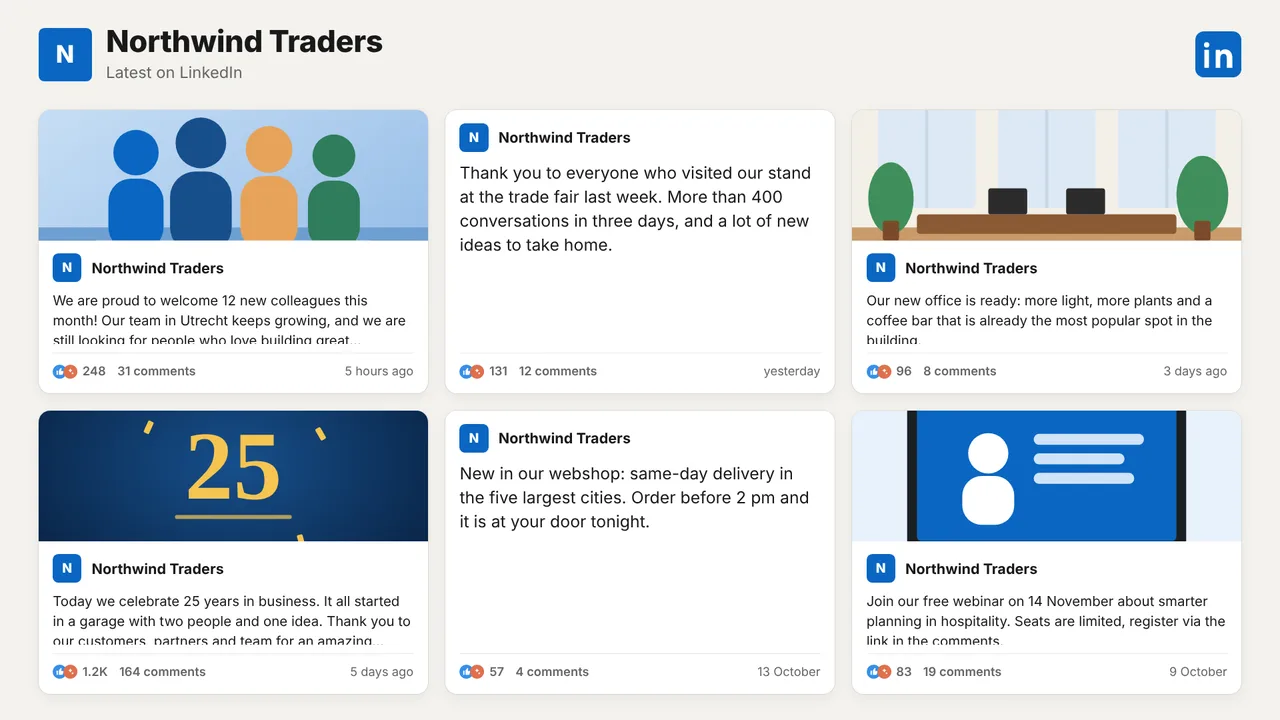
The posts you write for LinkedIn tell visitors and colleagues what your company is proud of: new colleagues, a project delivered, an event coming up. Paste the link to your company page and the screen in your reception, canteen or stand shows its latest posts with text, image and reactions. You decide which posts appear, and new posts come in when you press Refresh posts.

Start free, 1 screen includedSee how it connects

Premium plugin, included in the Pro and Business plans. Free plan, no credit card required. Paid plans from €5/month. Plugin version v1.1, released 2026-10-22.
LinkedIn on a TV screen
On the screen

What the screen shows

Latest company posts

The text of each post, with its image when it has one.

Date and reactions

When it was posted, and the reactions and comments it got (or switch them off).

One at a time or a grid

A rotating feed with one post full screen, or a grid of up to six cards that turns pages.

You choose what shows

Hide any post with one click; hidden posts never reach a screen.

Light or dark

In the colours of LinkedIn, in Dutch, English or German.

Landscape and portrait

The layout adapts to a standing screen by itself.

Setup

How it connects

01
Copy your page link

Open your company page on LinkedIn and copy the link (linkedin.com/company/...).

02
Fetch the posts

Paste it in the LinkedIn plugin and click Fetch posts. Within a minute the latest posts are in.

03
Add to a playlist

Hide what you do not want on screen, then add the feed to a playlist or give it a screen.

Privacy

What reaches the screen

TVpilot reads the public posts of your company page, the posts anyone can see on LinkedIn, without a LinkedIn login or password. Images are stored with the posts so the screen keeps showing them. Nothing is ever posted to LinkedIn.

Read only: TVpilot never changes anything in the source
Credentials sealed at rest, never shown again after saving
Revoke on the platform side at any time and the screen stops
Any TV

Show it on the TV you already own

TVpilot turns the hardware you have into a managed screen: an Amazon Signage Stick with the TVpilot app, a Raspberry Pi with one command, a Fire TV Stick or Android TV, or simply the browser of a smart TV. One player URL per screen, managed from the dashboard.

Amazon Signage StickRaspberry Pi signageFire TV Stick signageSmart TV, no hardware
Pricing

Included in Pro and Business

This is a Premium plugin: it comes with the Pro and Business plans. Start free with your first screen and upgrade when you add it.

Free
€0forever

Perfect for trying TVpilot with one screen.

Start free
Starter
€5/month

For small teams and single locations.

Start free
Pro
€19/month

For growing businesses with multiple locations.

Start free
Business
Customon request

Enterprise-grade signage at any scale.

Contact sales

Start on the free plan and stay there as long as you like. No credit card, no trial clock.

FAQ

Frequently asked questions

Do I need to log in to LinkedIn?

No. TVpilot reads the public posts of the company page from its link. Personal profiles are not supported, only company pages.

How do new posts reach the screen?

Press Refresh posts in the feed settings, once per 24 hours. The screen keeps showing the stored posts in between, also when the internet drops out.

Can I keep a post off the screen?

Yes. Every stored post has a Hide button. A hidden post leaves the screens right away.

Which plan do I need?

LinkedIn company posts is a Premium plugin, included in the Pro and Business plans.

Also see:Social media wall · Trainin · Power BI · All social media

Your LinkedIn page, on the screen in reception

Show the latest posts of your LinkedIn company page on your office and reception screens: text, image, date and reactions, as a rotating feed or a grid. Paste the page link, no LinkedIn login needed.

Start free with TVpilot

LinkedIn is a trademark of LinkedIn Corporation. TVpilot is not affiliated with LinkedIn.