Members want to know which class still has room before they open the app. Enter your Trainin address and the screen in your gym shows the coming classes with time, trainer and free spots, in the activity colours you set in Trainin and under your own logo. It refreshes by itself, so a full class turns red and a finished class drops off without anyone touching the screen.
Free plan, no credit card required. Paid plans from €5/month. Plugin version v1.0, released 2026-10-02.
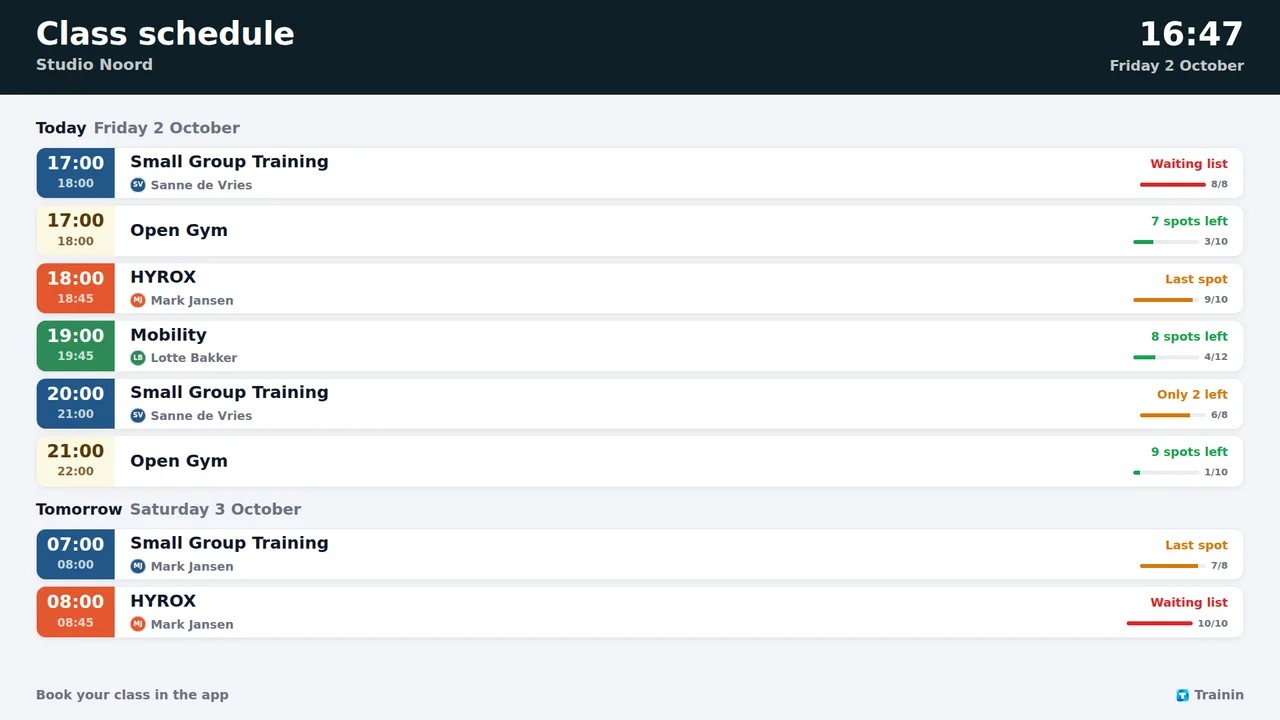
Time, class and trainer, grouped per day.
Spots left with a small occupancy bar, amber when almost full, red when full or on the waiting list.
Every class in the activity colour you picked in Trainin, under your studio logo and colour.
A list for today and tomorrow, or the whole week in columns per day.
Pick which classes appear and hide the full ones.
The class that is on right now is marked live.
For example yourstudio.trainin.app, then click Check.
TVpilot finds your studio, logo and classes. Pick what to show.
Between your promo slides, or on a screen of its own by the entrance.
TVpilot reads the public group schedule of your studio, the same page your members book from: class names, times, trainer names and the number of free spots. No member names or bookings are read. Only when you paste an iCal link instead is that link stored, and it is only used by the server.
TVpilot turns the hardware you have into a managed screen: a Raspberry Pi with one command, a Fire TV Stick or Android TV, or simply the browser of a smart TV. One player URL per screen, managed from the dashboard.
Every plugin is included in every plan. You pay for screens, not for integrations.
Start on the free plan and stay there as long as you like. No credit card, no trial clock.
No. The board reads the public group schedule of your studio. Your Trainin address is enough.
It refreshes by itself every few minutes, so a class that fills up shows as full shortly after.
Yes. Paste the iCal link from Trainin (Agenda synchroniseren). An iCal feed has no free spots, so the board then shows times and classes only.
Yes. Pick the classes under Which classes, and turn on Hide full classes to show only classes with room.
Show the coming classes of your Trainin studio on the screens in your gym: time, class, trainer and free spots, in your own activity colours and logo. Enter your Trainin address, no login or key needed. Free plan available.
Start free with TVpilotTrainin is a trademark of Trainin B.V. TVpilot is not affiliated with Trainin.