HubSpot dashboard

HubSpot on the sales floor TV: the month, the pipeline, the wins

A HubSpot sales dashboard for the screen the whole team can see: how many deals were won this month and what they brought in, what is still in the pipeline and in which stage, who closed the most and which deals just came in. Create a private app in your own HubSpot account, paste its token, pick your tiles and the board is on the wall.

Start free, 1 screen includedSee how it connects

Free plan, no credit card required. Paid plans from €5/month. Plugin version v1.0, released 2026-10-22.
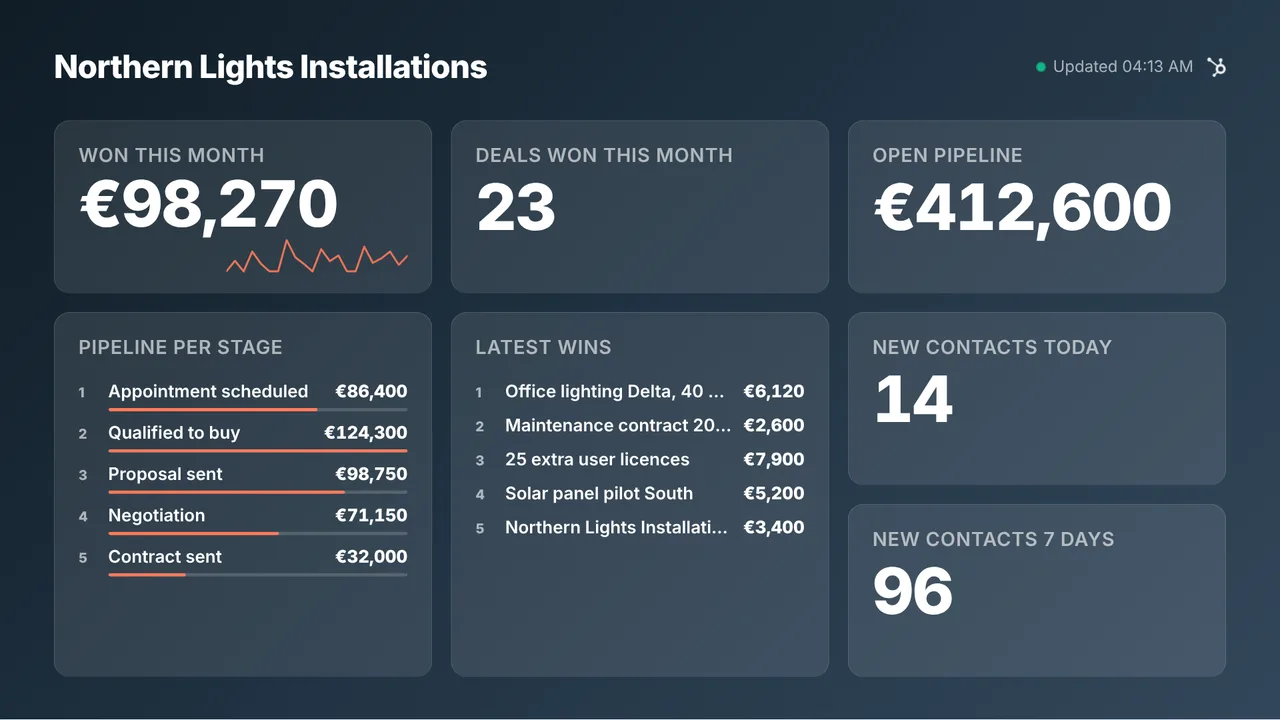
HubSpot on a TV screen
On the screen

What the screen shows

Deals won and won revenue this month

The current calendar month by close date, in your HubSpot account currency, with a day-by-day line under the revenue.

Open pipeline value

The amount of every deal that is not closed yet, across all your pipelines.

Pipeline per stage

The open value per deal stage with the number of deals, in the order of your pipeline, with a bar per stage so the funnel reads from across the room.

Top sellers this month

Won amount per deal owner, top five. Optional, because it puts names on the screen.

Latest won deals

The five most recent wins with the amount and the owner. Pairs well with the confetti when a new deal is won.

New contacts and open tickets

Contacts created today and in the last 7 days, and the open tickets when your private app may read tickets.

Setup

How it connects

01
Create a private app in HubSpot

In HubSpot open Development, Legacy apps and create a private app (older accounts: Settings, Integrations, Private apps). Add the read scopes for deals, deal schemas, owners and contacts, and tickets if you want that tile.

02
Paste the access token in TVpilot

Copy the token from the Auth tab of the app. The connection test shows which parts of HubSpot the token can read.

03
Choose tiles, push to screen

Drag the tiles into your order, star the two that deserve to be big, pick a design and push the board to a screen or a playlist.

Privacy

What reaches the screen

Only totals, stage names, deal names and the names of deal owners reach the screen, never a contact. The token is stored encrypted on our servers, only ever used to read and never shown again after you save it. Delete the private app in HubSpot and the board stops at once. With amounts switched off, the board shows counts instead of money.

Read only: TVpilot never changes anything in the source
Credentials sealed at rest, never shown again after saving
Revoke on the platform side at any time and the screen stops
Any TV

Show it on the TV you already own

TVpilot turns the hardware you have into a managed screen: an Amazon Signage Stick with the TVpilot app, a Raspberry Pi with one command, a Fire TV Stick or Android TV, or simply the browser of a smart TV. One player URL per screen, managed from the dashboard.

Amazon Signage StickRaspberry Pi signageFire TV Stick signageSmart TV, no hardware
Pricing

Free for your first screen

This plugin is included in every plan, the free one too. You pay for screens, not for integrations.

Free
€0forever

Perfect for trying TVpilot with one screen.

Start free
Starter
€5/month

For small teams and single locations.

Start free
Pro
€19/month

For growing businesses with multiple locations.

Start free
Business
Customon request

Enterprise-grade signage at any scale.

Contact sales

Start on the free plan and stay there as long as you like. No credit card, no trial clock.

FAQ

Frequently asked questions

Do I need a paid HubSpot plan?

No. Private apps work on every HubSpot account, including the free CRM. The tiles read deals, pipelines, owners, contacts and tickets through the standard CRM API.

Which month does the board count?

The current calendar month by close date, in the time zone and currency of your HubSpot account. On the first of the month the won tiles start again at zero.

Does it work with several pipelines?

Yes. The open pipeline counts every open deal, and Pipeline per stage lists the stages of each pipeline with the pipeline name next to them.

Can the board show seller names?

Only if you add Top sellers or Latest won deals. They are never on a new board by default. Use them where the team agrees with that.

How often does the board refresh?

Every 5 minutes, which keeps a wall of screens well inside the HubSpot API limits. The screen keeps the last known numbers through a connection hiccup.

Can I hide the amounts?

Yes. Switch amounts off in the editor and the board shows deal counts per stage and per seller instead of money. Handy for a screen visitors can see.

Also see:Help Scout · Zendesk · Shopify · Power BI · All tv dashboards · TV dashboards

HubSpot on the sales floor TV: the month, the pipeline, the wins

Put HubSpot on the office TV: deals won and revenue this month, the open pipeline per stage, top sellers and new contacts, live. Connect with a private app token, read only, free plan available.

Start free with TVpilot

HubSpot is a trademark of HubSpot, Inc. TVpilot is not affiliated with HubSpot.