Now serving, on the screen you already have
A bakery, pharmacy, service desk or town hall counter does not need a separate number display kit. Customers take a number from the ticket roll on the counter, or scan a QR code for a ticket on their own phone. Staff press Next on a phone, a presenter or a wireless button, and the number appears big on every screen with a chime, over your promotions or as a full-screen board.
Free plan, no credit card required. Paid plans from €5/month. Plugin version v1.4, released 2026-10-31.
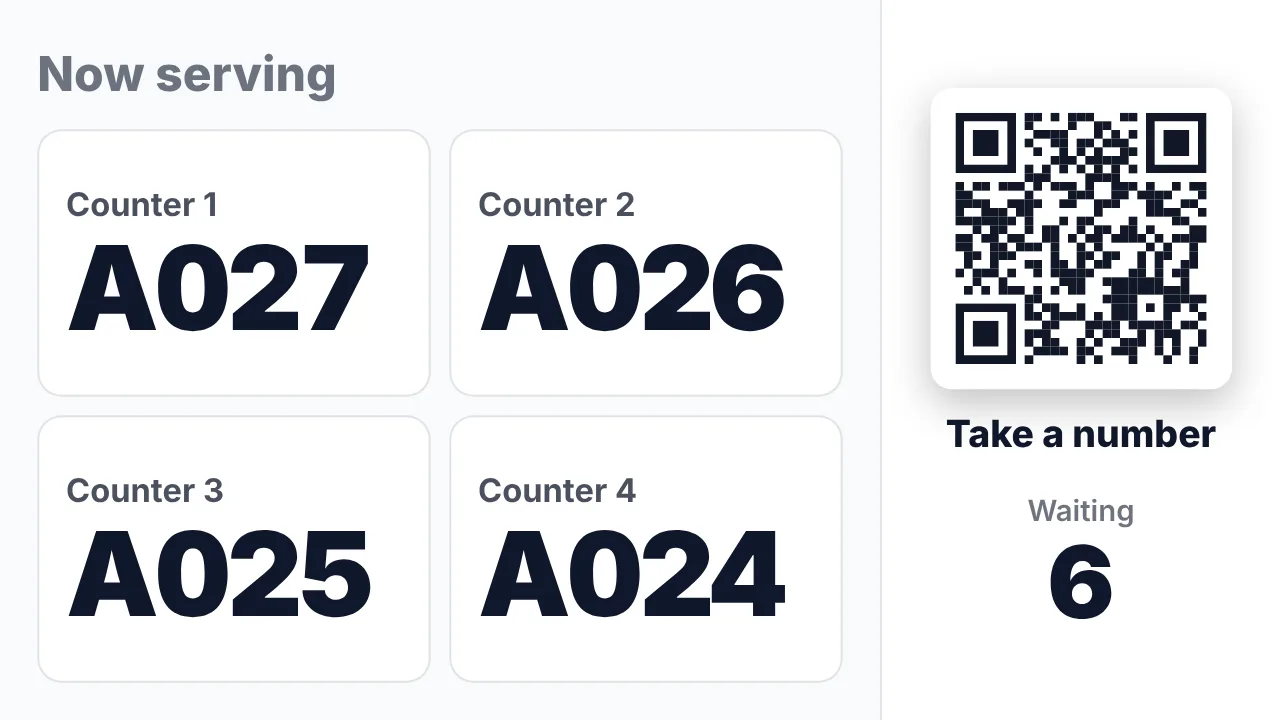
What the screen shows
Big and clear, with a chime and optionally a spoken call such as "Number A 42, please go to counter 3".
One tile per counter, desk, till, room or window, with your own names.
A banner in a corner of every slide, that fills the screen for a few seconds on each call.
The board can show the QR code and how many people are waiting.
A digital ticket shows the number, how many people are ahead and an estimated wait.
Served today, average and longest wait, the busiest hour and the last 7 days.
How it connects
Choose the paper ticket roll you already have or digital tickets by QR, and the number of counters.
In the playlist, add the queue as a banner over every slide or as a full-screen board.
On the console on a phone or tablet, a presenter or foot pedal on the player, or a wireless button.
What reaches the screen
Customers get a number, never a name: no app, no account and no personal data on the digital ticket. Staff use a console link that can be protected with a PIN, and every link can be replaced in one click.
Show it on the TV you already own
TVpilot turns the hardware you have into a managed screen: an Amazon Signage Stick with the TVpilot app, a Raspberry Pi with one command, a Fire TV Stick or Android TV, or simply the browser of a smart TV. One player URL per screen, managed from the dashboard.
Free for your first screen
This plugin is included in every plan, the free one too. You pay for screens, not for integrations.
Try TVpilot on one screen, for as long as you like.
- 1 screen
- 250 MB storage
- All standard plugins
- Scheduling: 1 calendar
For a shop, practice or restaurant with a few screens.
- 3 screens included, up to 10
- 2 GB storage
- Premium available as an add-on
- Version history
- Scheduling: 5 calendars
For offices, schools and chains, with every Premium feature.
- 10 screens included, up to 100
- 10 GB storage
- All Premium features
- Up to 3 users, up to 3 locations
- Version history
For organizations with a team, approvals and many locations.
- 25 screens included, up to 100
- 100 GB storage
- All Premium features
- Up to 25 users, unlimited locations
- Approval before publishing
- Own branding, priority support
- Extra screens from €1.50
- Premium on Starter €9
- Extra storage €10 per 25 GB
- Cancel monthly
- Prices excl. VAT
Frequently asked questions
Do I need a ticket machine?
No. Keep the paper ticket roll you have and TVpilot counts along, or let customers take a number on their own phone by scanning a QR code.
How do staff call the next number?
With the console on a phone or tablet, a presenter, foot pedal or keypad on the Raspberry Pi or the TVpilot app, or a wireless button such as Shelly or Flic.
Does the screen make a sound?
Yes, a chime or a loud chime, and optionally a spoken call after it. Sound plays on the Raspberry Pi and the TVpilot app; some smart-TV browsers block sound.
Can a photo of the QR code be used from home?
Not with Only on site switched on: the QR code on the screen then changes every 10 minutes.
Which plans include it?
Now serving is part of the Pro and Business plans.
Now serving, on the screen you already have
Call the next customer with a button, presenter or phone and show the number big on every screen, with a chime. Paper ticket roll or a QR ticket on the phone. In the Pro and Business plans.
Start free with TVpilot