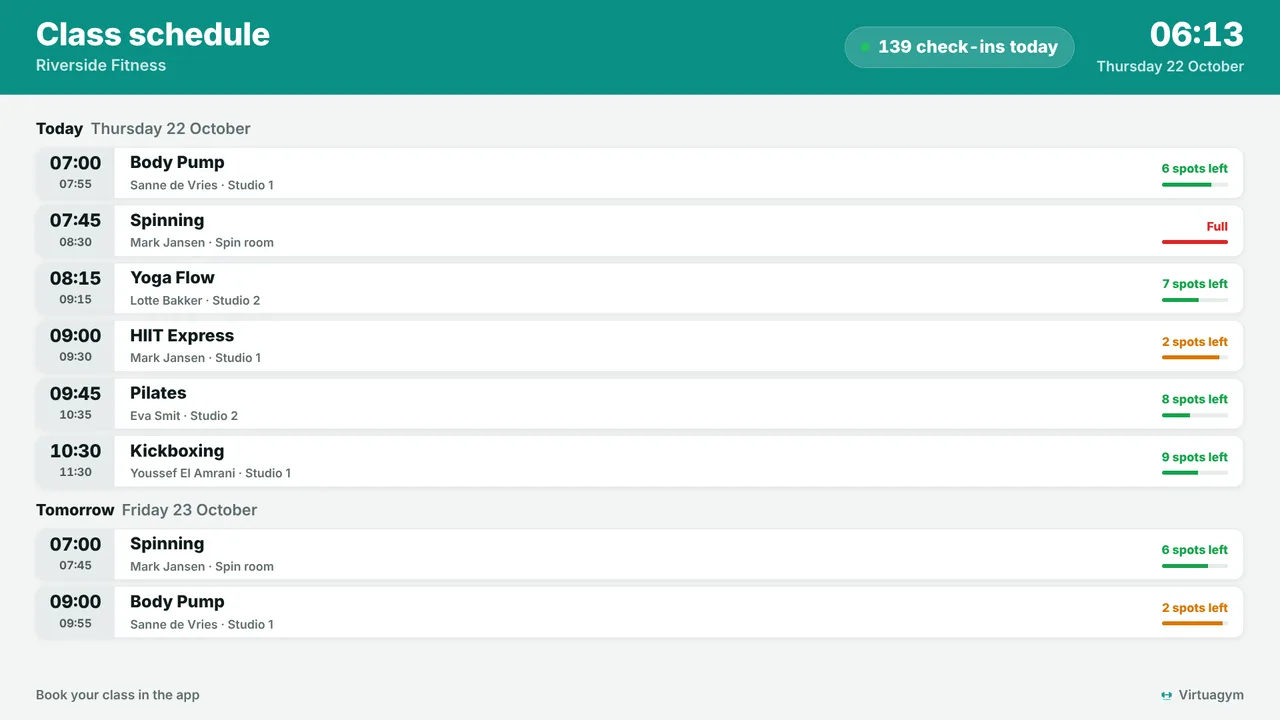
Members walking in want to know what is on next and whether there is still room. Connect your Virtuagym club once and the screens in your gym show the rest of today's group classes with time, instructor, room and spots left. The class that is on right now is highlighted, finished classes drop off by themselves and a class that fills up turns red, without anyone touching the screen.
Free plan, no credit card required. Paid plans from €5/month. Plugin version v1.0, released 2026-10-22.
On the screen
What the screen shows
Classes from now on
The rest of today, or today and tomorrow, with start and end time.
Instructor and room
Who teaches the class, and the room when Virtuagym has one for it.
Spots left
For example 3 spots left, amber when almost full and Full in red. Hidden for classes without a maximum.
On now
The class that is running is highlighted until it ends.
Check-ins today
An optional counter of how many members checked in today.
Only what you want
Filter by class or room, hide full classes, light or dark, portrait or landscape.
Setup
How it connects
01
Copy your API details
In Virtuagym, open System settings > Business info > Advanced and copy the API key, club secret and club ID.
02
Connect your club
An admin pastes them into the Virtuagym plugin in TVpilot. TVpilot checks the connection straight away.
03
Create a board and add it to a playlist
Pick the classes and rooms, then add the board between your promo slides or on a screen of its own.
Privacy
What reaches the screen
TVpilot reads your club's group classes through the Virtuagym API with your API key: class names, times, instructor names, rooms and the number of bookings per class, and, only when you turn on the counter, the number of check-ins today. No member names are shown on the screen. The API key and club secret are stored encrypted, only admins can enter them and only the server uses them; screens never receive them.
Read only: TVpilot never changes anything in the source
Credentials sealed at rest, never shown again after saving
Revoke on the platform side at any time and the screen stops
Any TV
Show it on the TV you already own
TVpilot turns the hardware you have into a managed screen: an Amazon Signage Stick with the TVpilot app, a Raspberry Pi with one command, a Fire TV Stick or Android TV, or simply the browser of a smart TV. One player URL per screen, managed from the dashboard.
Your whole team, safely.Roles for every colleague, and nothing goes live without approval.
What you keep
€17.08 per month
For 3 screens you pay €5 per month on Starter. At a typical per-screen price for the same features that is €22.08.
TVpilot Starter€5
Per screen elsewhere€22.08
Compared with typical per-screen prices for the same features: $8 standard, $12 with premium features, $15 with a team and approvals, per screen per month, billed yearly, converted at €0.92.
The group classes you plan in Virtuagym on your gym screens: time, class, instructor, room and spots left, the class on now highlighted, and today's check-ins.