Zermelo
Premium

Zermelo on every screen in your school

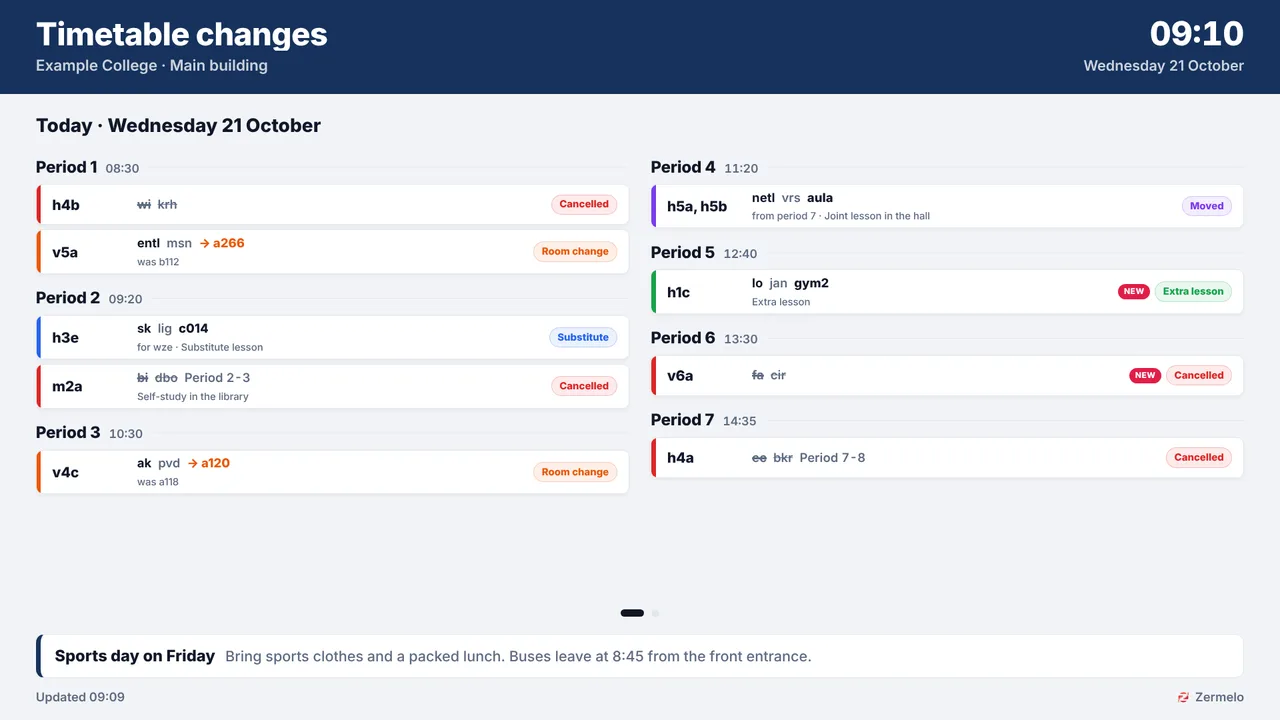
Since phones stay in the locker, students look at the screens in school for what they need to know. Connect your Zermelo portal once and choose per screen what it shows: timetable changes in the hallway (cancelled lessons, room changes, substitutes and moved lessons per lesson hour), a door sign by every classroom with the lesson now and next, a board of the rooms that are free right now for students looking for a place to study, and the announcements from Zermelo. Everything follows Zermelo by itself.

Start free, 1 screen includedSee how it connects

Premium plugin, included in the Pro and Business plans. Free plan, no credit card required. Paid plans from €5/month. Plugin version v1.4, released 2026-10-21.
Zermelo on a TV screen
On the screen

What the screen shows

Changes per lesson hour

Cancelled, other room, moved and substitute, per hour or per class, with what it was before.

Calm pages

Quiet days fit one page; busy days turn pages by themselves, in step on every screen.

Door signs

One classroom: the lesson now with a progress bar, the next one and the rest of the day.

Free rooms

Which rooms are free right now and until when, a cancelled lesson included.

Announcements

The announcements from Zermelo along the bottom, or full screen one at a time.

Today and the next school day

From a time you choose, the next school day joins today; weekends and holidays are skipped.

Filters that matter

Per branch and department, substitutes on or off, activities and exams included or not.

Always current

New changes appear within a minute, with the time of the last update in the corner.

Setup

How it connects

01
Add TVpilot as a partner

In Zermelo under Beheer > Partners, add TVpilot, grant read access and create an API token.

02
Paste the code

Enter your portal name and the authorization code in TVpilot. The connection is checked right away.

03
Make a board

Pick timetable changes, a door sign, free rooms or announcements, then add it to a playlist.

Privacy

What reaches the screen

TVpilot reads the timetable through the official Zermelo API with read-only rights your school grants: lesson times, classes, subjects, rooms and teacher codes, plus the announcements. Student names and student data are never requested. Teacher codes and the timetabler's remarks can be switched off per board. The token is stored encrypted and only used by the server; screens never receive it.

Read only: TVpilot never changes anything in the source
Credentials sealed at rest, never shown again after saving
Revoke on the platform side at any time and the screen stops
Any TV

Show it on the TV you already own

TVpilot turns the hardware you have into a managed screen: an Amazon Signage Stick with the TVpilot app, a Raspberry Pi with one command, a Fire TV Stick or Android TV, or simply the browser of a smart TV. One player URL per screen, managed from the dashboard.

Amazon Signage StickRaspberry Pi signageFire TV Stick signageSmart TV, no hardware
Pricing

Included in Pro and Business

This is a Premium plugin: it comes with the Pro and Business plans. Start free with your first screen and upgrade when you add it.

Free
€0forever

Perfect for trying TVpilot with one screen.

Start free
Starter
€5/month

For small teams and single locations.

Start free
Pro
€19/month

For growing businesses with multiple locations.

Start free
Business
Customon request

Enterprise-grade signage at any scale.

Contact sales

Start on the free plan and stay there as long as you like. No credit card, no trial clock.

FAQ

Frequently asked questions

Does this work with the Zermelo Partners menu?

Yes. TVpilot connects the way Zermelo asks new partners to connect: the school adds TVpilot under Beheer > Partners, grants read access and creates the API token there. Schools on the older setup can use an API user with the right Lezen: Roosters en afspraken.

How fast do changes reach the screens?

Within about a minute. All screens of one branch share one request to Zermelo, so the school portal is never flooded.

Can we hide teacher codes?

Yes, per board. The timetabler's remarks can be hidden too, for when they might contain names.

What happens after the summer?

Boards keep working in the new school year: they follow the branch, not this year's timetable project, as soon as the new year is set up in Zermelo.

Which plan do I need?

The Zermelo plugin is a Premium plugin, included in the Pro and Business plans.

Also see:Meeting room panel · Calendar · Clock widget · QR and Wi-Fi · All education · Nederlands

Zermelo on every screen in your school

Put Zermelo on every screen in your school: timetable changes per lesson hour, a door sign per classroom, the rooms that are free right now and the Zermelo announcements. Connected as a Zermelo partner, updated within a minute.

Start free with TVpilot

Zermelo is a trademark of Zermelo. TVpilot connects through the official Zermelo API and is not part of Zermelo.