Calendar

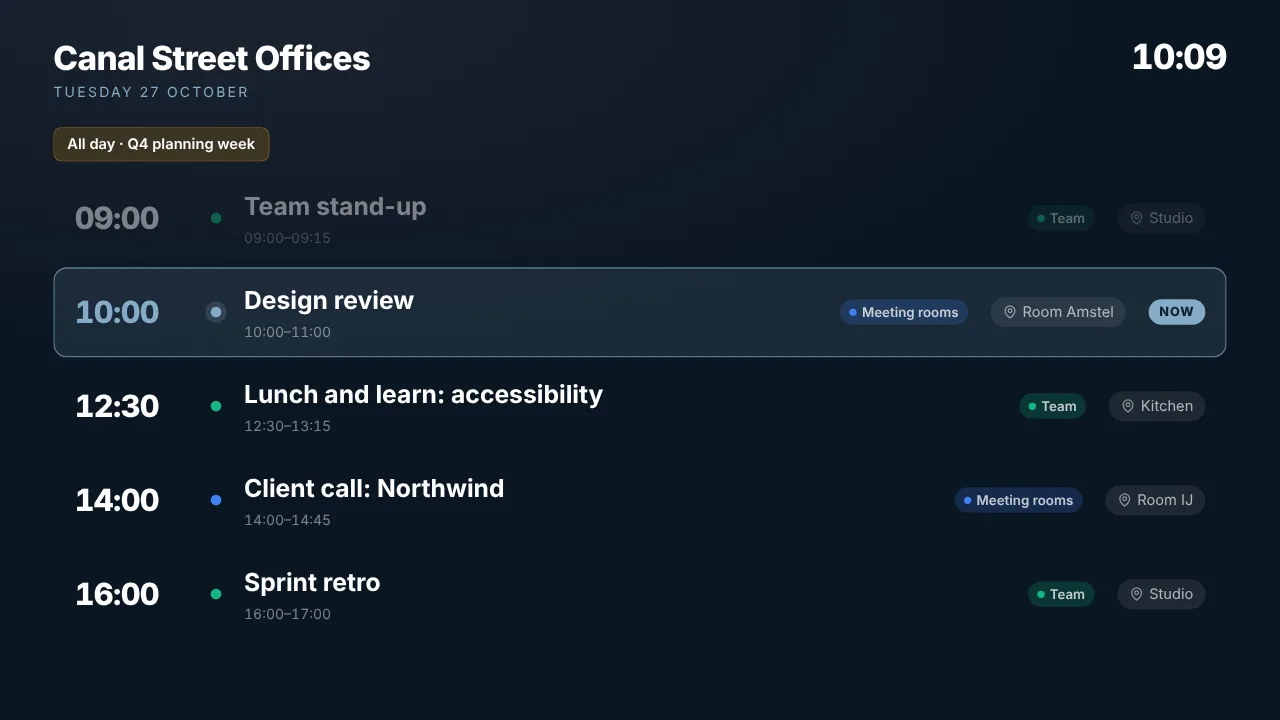
The team calendar on the wall

Who is where, what is on today, what the week looks like: paste the iCal link of any calendar and the screen shows it as an agenda, a day or a week view, refreshed by itself. Google Calendar, Outlook, Apple Calendar or any other .ics feed.

Free plan, no credit card required. Paid plans from €5/month. Plugin version v1.2.

Calendar on a TV screen
On the screen

What the screen shows

Agenda, day or week

A list of what is coming, today by the hour, or the whole week.

Any calendar with an iCal link

Google Calendar, Outlook, Apple Calendar, an .ics feed from your planning tool.

Refreshed automatically

A change in the calendar reaches the screen by itself.

Your colours

Dark or light, brand colours.

Setup

How it connects

01
Copy the iCal link

Google: calendar settings, secret address in iCal format. Outlook: publish calendar, ICS link. Apple: public calendar link.

02
Paste it and pick a view

Agenda, day or week, and your colours.

03
Push to screen

Add the calendar to a playlist or give it a screen.

Privacy

What reaches the screen

The widget reads the iCal feed you paste and shows its events. No account is connected; revoke the link at the calendar side to stop it. Use a calendar meant for a shared screen, not a personal one.

Read only: TVpilot never changes anything in the source
Credentials sealed at rest, never shown again after saving
Revoke on the platform side at any time and the screen stops
Any TV

Show it on the TV you already own

TVpilot turns the hardware you have into a managed screen: an Amazon Signage Stick with the TVpilot app, a Raspberry Pi with one command, a Fire TV Stick or Android TV, or simply the browser of a smart TV. One player URL per screen, managed from the dashboard.

Amazon Signage StickRaspberry Pi signageFire TV Stick signageSmart TV, no hardware
Pricing

Free for your first screen

This plugin is included in every plan, the free one too. You pay for screens, not for integrations.

How many screens?

Free

Try TVpilot on one screen, for as long as you like.

Does not fit 3 screensOnly for 1 screen
Start free
Included1 screen
Extra screennot possible
Storage250 MB
  • All standard plugins
  • Scheduling: 1 calendar

Free, forever.No credit card. Try it on one TV.

Best fit for you

Starter

For a shop, practice or restaurant with a few screens.

3 screens€5per month
Choose Starter
Included3 screens
Extra screen€2 per month
Storage2 GB
  • Premium available as an add-on
  • Version history
  • Scheduling: 5 calendars

3 screens for €5.Each extra screen €2 per month.

Pro

For offices, schools and chains, with every Premium feature.

3 screens€29per month
Choose Pro
Included10 screens
Extra screen€2 per month
Storage10 GB
  • All Premium features
  • Up to 3 users, up to 3 locations
  • Version history

10 screens, all Premium.Review walls, triggers and the emergency alert included.

Business

For organizations with a team, approvals and many locations.

3 screens€99per month
Choose Business
Included25 screens
Extra screen€1.50 per month
Storage100 GB
  • All Premium features
  • Up to 25 users, unlimited locations
  • Approval before publishing
  • Own branding, priority support

Your whole team, safely.Roles for every colleague, and nothing goes live without approval.

What you keep

€17.08 per month

For 3 screens you pay €5 per month on Starter. At a typical per-screen price for the same features that is €22.08.

TVpilot Starter€5
Per screen elsewhere€22.08

Compared with typical per-screen prices for the same features: $8 standard, $12 with premium features, $15 with a team and approvals, per screen per month, billed yearly, converted at €0.92.

  • Extra screens from €1.50
  • Premium on Starter €9
  • Extra storage €10 per 25 GB
  • Cancel monthly
  • Prices excl. VAT

See every feature per plan

FAQ

Frequently asked questions

Do I need to connect my Google or Microsoft account?

No. The iCal link is enough. Keep the link private: anyone who has it can read the calendar.

Can I show a room calendar as free or busy?

That is the Meeting room panel: it shows free or busy now, the current booking and what is next.

How fast do changes appear?

The feed is refreshed automatically several times an hour; some calendar providers delay their iCal export by a few minutes.

Related articles
Cloud Based Digital Signage Software: How It Works
Digital Signage Scheduling: Plan Content Ahead of Time
Self Hosted Digital Signage: When It Makes Sense
Also see:Meeting room panel · Clock widget · Weather widget · News feed · All core widgets

The team calendar on the wall

Show a Google Calendar, Outlook or Apple Calendar live on any TV as an agenda, day or week view. Paste the iCal link, no account connection. In every plan.