Cloud Based Digital Signage Software: How It Works
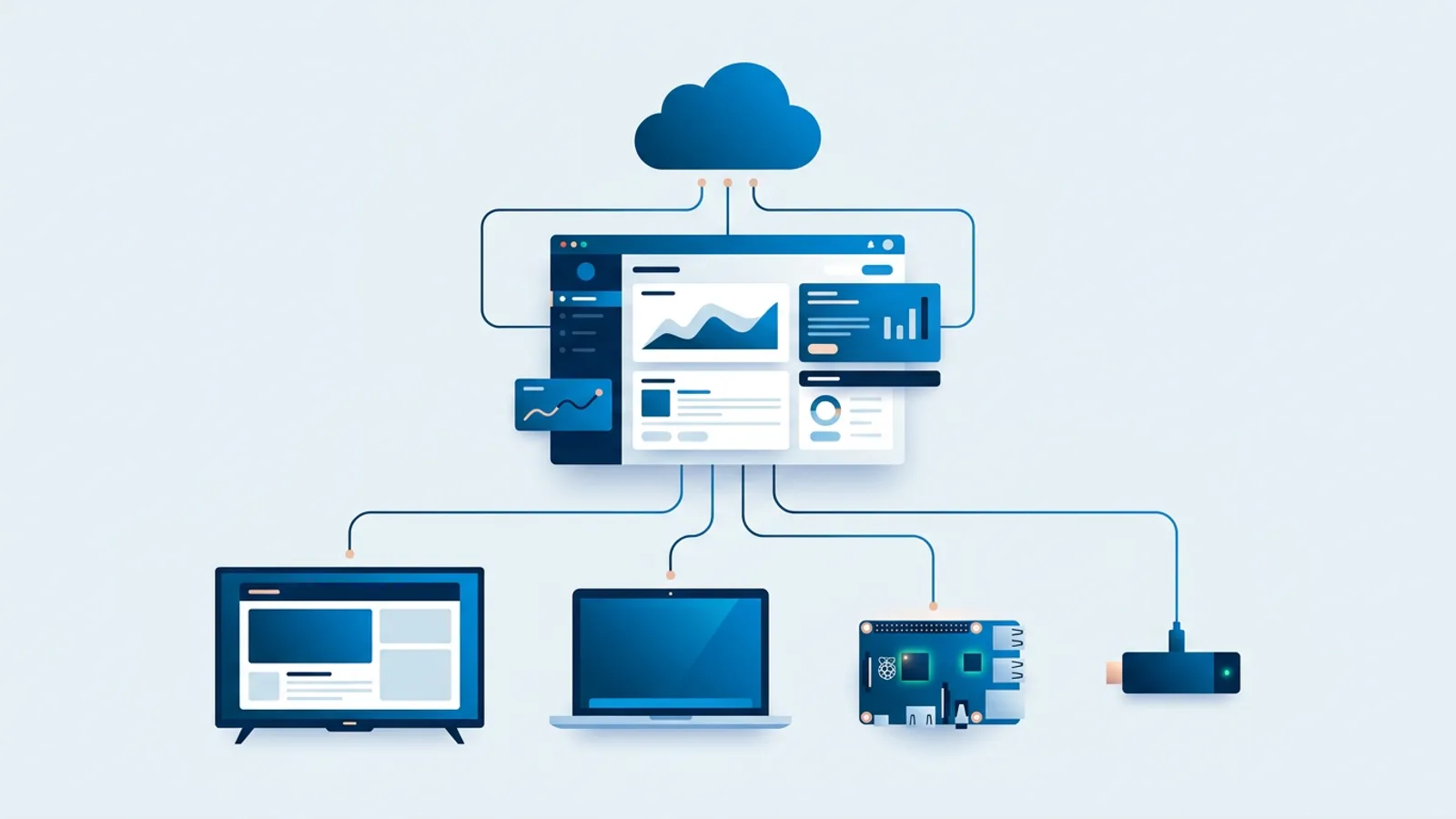
Cloud based digital signage software is signage software where you manage content in a web dashboard and your screens fetch it over the internet, so there is no local server to install or maintain. It suits small businesses, offices and multi-location teams without dedicated IT who want to change what's on a TV from any browser, including the one on their phone.
In practice, your media, playlists and schedules live on the vendor's servers, and the screen is a player that downloads and displays whatever you've assigned to it. You log in, make a change, and it shows up on the TV without touching the screen or installing anything on a PC in the back room. You also skip the VPN you would otherwise need to reach a machine sitting next to the till.
Because the software runs in the cloud, the screen side gets simpler too. A cloud signage player can be a Raspberry Pi, a smart TV's built-in browser, a Fire TV Stick running a browser, or an old laptop behind a monitor. The player's job is small: open a URL, show what's pushed to it, keep running. If you want to start with no extra hardware at all, a page like browser and smart TV signage shows that route, but the principle holds across vendors, not just for one specific box.
What cloud based digital signage software actually means
Strip away the marketing language and a cloud digital signage system has three parts:
- A dashboard where you upload media, build playlists and set schedules.
- A player, some piece of hardware or software on the screen, that checks in with the dashboard and pulls down whatever it's supposed to show.
- The connection between them, which is the internet.
In an on-premise or self-hosted setup, the scheduling software runs on hardware you own and maintain, often on the same local network as the screens. Self-hosting gives you more control over data and infrastructure, and for some organizations (regulatory requirements, no reliable internet, an IT team that wants to own the stack) it's the right call. Our self-hosted digital signage checklist covers when that tradeoff makes sense. Cloud signage trades some of that control for not having to run a server at all.
What this looks like day to day with TVpilot
TVpilot is one example of the cloud model, not the only way to build it, but walking through how it works makes the abstract idea concrete.
You build playlists in the dashboard: images, videos, web pages and PDFs, dragged into order, with transitions and per-slide durations. Each slide can carry its own dayparting rules, so a lunch menu slide only appears on weekdays between 11:00 and 14:00, or a happy-hour promo only shows after 17:00, without you editing the playlist every day. A slide can also get an expiry date, after which it takes itself off screen.
For bigger structure, the Schedule page works on a calendar. You assign which playlist plays on a screen on which day, with one-off items for a specific event and weekly repeating slots for recurring patterns. A retail chain could plan a year of seasonal campaigns in one sitting; a restaurant could set breakfast, lunch and dinner menus once and let them rotate. When nothing is scheduled, the screen falls back to its default playlist, so an empty slot on the calendar never leaves a screen dark.
Sometimes you need to override all of that on the spot. "Show now" pushes any playlist to one or more screens immediately for 30 minutes, an hour, two hours, until a chosen time, or indefinitely, and the screen returns to its normal schedule automatically afterward. That's the practical difference between cloud signage and a screen with a USB stick in it: you can react to a last-minute closure or a flash sale from your phone.
Remote monitoring is the other half of the picture. The dashboard shows whether each screen is online, its Wi-Fi signal, and (on the Raspberry Pi player) whether the TV is on or in standby. If a screen misbehaves, you can trigger a remote update or reboot instead of driving to the location. The Pi player also checks for updates daily at 03:00 and applies them automatically.
A worked example
Say you run a bakery with two screens: a smart TV above the counter showing the menu and a Raspberry Pi 4 on a window TV showing promos. Two screens is more than the Free plan's one, so you'd be on Starter at €5 per month (3 screens included, 2 GB storage). You set a weekly calendar slot so the lunch playlist runs weekdays 11:00 to 14:00 and the default playlist covers the rest of the day. On a Saturday the oven breaks, so you use Show now from your phone to push a "Bread only today" playlist to both screens until 18:00. On Sunday morning both screens are back on their normal plan without you doing anything.
Cloud signage isn't tied to one box
Because the player is a browser pointed at a URL, the same TVpilot account can run on:
- A Raspberry Pi, using a one-command installer that sets up Chromium kiosk mode, auto-start, and a watchdog that restarts the player within about 10 seconds if it crashes.
- A smart TV's own browser, with no extra box.
- A Fire TV Stick with the Silk browser, or Chromecast with Google TV.
- An iPad, Mac, old laptop or mini PC you already have.
That flexibility means you're not stuck if a specific stick is discontinued, or if one location has different hardware than another. You can start on whatever's cheapest or already on hand and swap hardware later without losing content or schedules, since all of that lives in the dashboard, not on the device. If you're weighing the two most common routes, browser-based signage vs Raspberry Pi compares them in detail.
Cloud-based vs self-hosted digital signage
| Cloud-based (e.g. TVpilot) | Self-hosted | |
|---|---|---|
| Setup | Sign up, connect a player with a claim code or player URL | Install server software, configure network access |
| Updates | Vendor updates the software; players update automatically | You install updates on server and players |
| Remote access | Any browser, anywhere | Usually local network or VPN |
| Cost | Monthly subscription per screen tier, no server hardware | No subscription for open source tools, but server hardware and staff time |
| Who maintains the server | The vendor | You or your IT team |
To be plain about it: TVpilot is hosted SaaS. It is not open source and you cannot self-host it. If you already run servers and want everything on infrastructure you control, self-hosting is a reasonable choice and a cloud vendor won't give you that. If you'd rather not run a server and want screens that update from a browser, cloud signage is built for exactly that. For a sense of what subscriptions typically look like, see digital signage software pricing.
What happens when the internet drops
"Cloud" means a screen needs an internet connection to receive new content and schedule changes. During an outage, nothing you change in the dashboard reaches that screen, and live content like web pages or review feeds can't refresh. Offline playback is limited, so a location with no reliable internet is a poor match for any cloud vendor, TVpilot included.
What does keep working:
- Players keep following the calendar schedule during an outage, so the lunch playlist still switches on at 11:00.
- A scheduled change is downloaded in advance and switches at the exact moment, even if the screen is offline at that time.
- Each screen can have a backup playlist. If its assigned content is empty or unavailable, it plays the backup instead of going black.
- The Raspberry Pi player keeps playing its last content and recovers automatically once the connection is back, then catches up with any changes you made in the meantime.
The failure mode to plan for is guest Wi-Fi with a login page, which can block a player from ever connecting; our guide to captive portals covers the fix. Check bandwidth requirements too if you plan to show a lot of video.
When TVpilot fits, and when it doesn't
TVpilot fits if you want to manage one screen or a few dozen from a browser, don't want to run or patch a server, and accept an internet-dependent update path (with the schedule, backup playlist and Pi recovery as a buffer, not a substitute for connectivity). The Free plan covers one screen with 250 MB of storage and no credit card, which is enough to test the real workflow before paying. It is a free plan, not a trial, so it doesn't expire.
It's not the right fit if you need a self-hosted, air-gapped or open-source stack. There is also no dedicated app in the Amazon Appstore or Google Play yet; Fire TV and Android TV run through the browser route (Silk, TV Bro or Fully Kiosk Browser with the player URL), which works but is good to know going in.
If you're still comparing the wider market, our digital signage software picks by use case is a reasonable next stop.
If the dashboard-and-browser model sounds like what you want, the quickest way to judge it is to use it: sign up for free, point a smart TV browser or Raspberry Pi at your player, and build your first playlist without a server or a credit card.
Frequently asked questions
What is cloud-based digital signage?
Cloud-based digital signage is a setup where you manage screen content, playlists and schedules in a web dashboard hosted by the vendor, and each screen fetches that content over the internet. You don't install or maintain a local server. Players can be a Raspberry Pi, a smart TV browser, a Fire TV Stick or an old laptop.
Is cloud digital signage secure?
It depends on the vendor's account controls and what you choose to display. In TVpilot you can turn on two-factor authentication, manage sessions, and give team members owner, admin, editor or viewer roles. Edits stay as drafts until someone presses Push to screen. Only show data that is safe for a public wall.
How much does cloud digital signage cost?
Pricing varies by vendor, usually per screen or per tier. TVpilot's Free plan is €0 forever for 1 screen and 250 MB storage. Starter is €5 per month with 3 screens included (up to 10), Pro is €29 per month with 10 screens included (up to 100), and Business is €99 per month with 25 screens included (up to 100). Extra screens cost €2 per month each on Starter and Pro and €1.50 per month on Business; for more than 100 screens, contact hello@tvpilot.app for custom pricing. There is no trial period.
Does cloud digital signage work without internet?
Only partly. Screens need internet to receive new content and changes. During an outage TVpilot players keep following the calendar schedule, a backup playlist prevents black screens when content is unavailable, and the Raspberry Pi player keeps playing and recovers automatically when the connection returns. Locations without reliable internet are a poor fit.