
Smart Prices. The right price on every screen.
One price list for one coffee bar or three hundred branches. Every screen shows the price of its own location: the standard price, its zone, its own exception, today's promotion. Change it once and every screen follows within a minute.
Premium plugin, included in Pro and Business, or as the Premium add-on on Starter. Works on the TVs and players you already have.
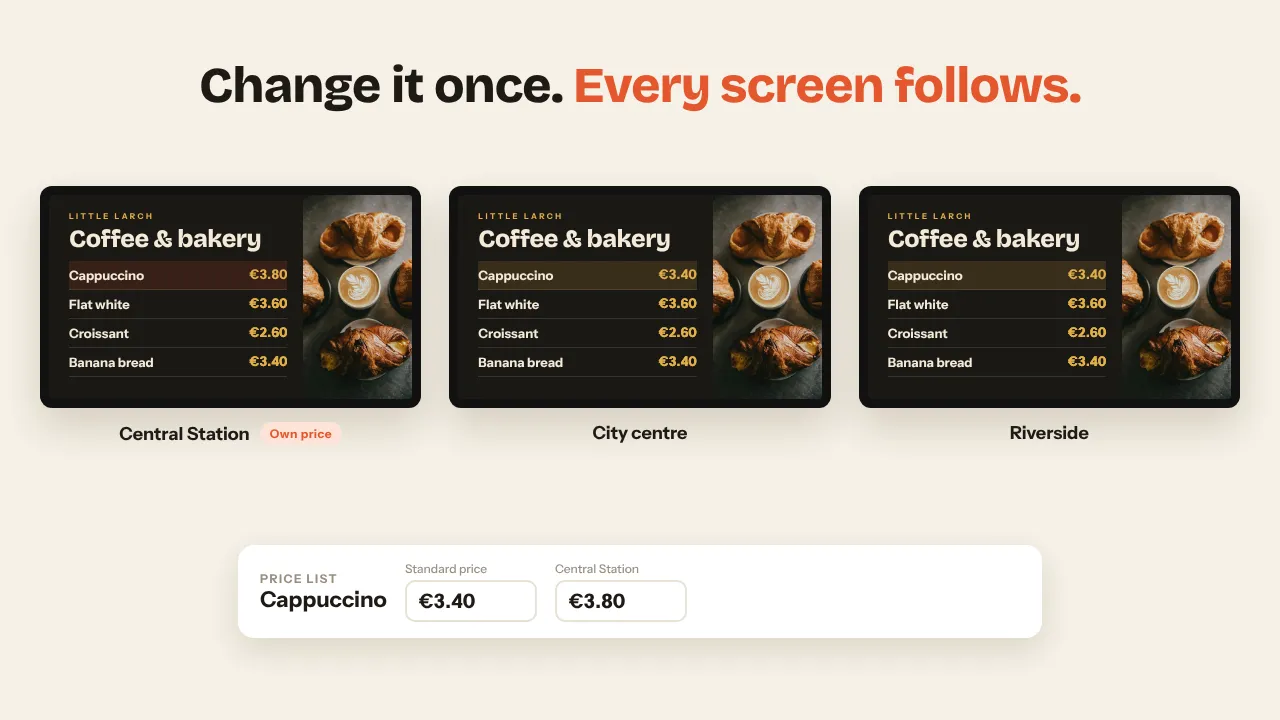
One standard price, exceptions only where they matter
A screen takes the most specific price there is: its own branch, then its zone, then the standard price with your rules on top. You only ever type the exceptions.
Built for one bar, ready for a chain
The branch cockpit
Your whole chain as a tree: all branches, your zones, every branch. Click a level and see the price that applies there, where it comes from, the exceptions, what is sold out and which screens still show older prices.
- Set an exception at any level, or put it back with one click
- An amber dot where a screen is behind
- On a phone the tree becomes a picker
Price rules instead of three hundred fields
A percentage, an amount, a price ending in ,99 or rounding to a step. For all branches, a zone or one branch, for all products, a category or one product. A price round for the whole chain is one change.
- Rounding always comes last
- A price set by hand wins over the rules of its level
- Pause a rule without deleting it
A whole menu, built by itself
The Price list block in the Designer lists a category or everything, with sizes as columns, descriptions, calories and allergens. New products appear on the screens without anyone touching the design.
- Or put one price anywhere with Insert a price
- Sold out shows your text, or hides the row
- Struck-through old price during a promotion
What a chain needs on top
Zones with their own currency
Group branches into zones such as Airport, City centre or United Kingdom. One zone price for all of them, in euros, pounds or any of 21 currencies.
Promotions and happy hours
A fixed promo price or a percentage off, for a period, on some weekdays, between two times, also past midnight. Screens switch on their own and can show the old price struck through.
Head office and franchise
A head office account shares its price list with its branch accounts. Lock a price, or allow a range: the franchisee picks a price between the minimum and the maximum.
Approval, history and undo
On Business, price changes can wait for an approver, four-eyes included. Every change is in the history with who, when and from where, and one click undoes it.
Proof of what was on screen
The screen report shows which prices each screen loaded in the last 30 days, compared with the current list. Export it as CSV for an audit.
Your till, ERP or a spreadsheet
Send prices through the Data API, or let Smart Prices read a CSV, a published Google Sheet or a JSON file every 15 minutes up to once a day.
A spreadsheet when you want one
The table view works like Excel: arrow keys, paste a block of prices, colours for above and below the standard price. Import and export as CSV.
Planned price changes
A new price for Monday 06:00, for the standard price, a zone or one branch. At that moment every screen switches by itself.
Data API
PATCH /api/data/v1/prices
{
  "items": [
    {
      "key": "cappuccino",
      "name": "Cappuccino",
      "category": "Coffee",
      "price": 3.2,
      "locations": {
        "Central Station": 3.4
      }
    },
    {
      "key": "latte.grande",
      "name": "Latte",
      "variant": "Grande",
      "price": 4.2,
      "zones": {
        "Airport": 4.9
      },
      "sold_out": {
        "Central Station": true
      }
    }
  ],
  "effective_at": "2026-11-23T06:00:00+01:00"
}From one menu board to a whole chain
One location
A coffee bar or bakery with one price list, sizes, allergens and a happy hour, and a menu that updates itself.
A few branches
The station charges more than the neighbourhood. One design, a price per branch only where it differs.
Chains and franchises
Zones, rules, head office with branch accounts, approval and a link to the till for dozens to hundreds of branches.
Included in Pro and Business
Smart Prices is a Premium plugin. Branches are the locations of your account.
- 10 screens included, up to 100
- 3 locations
- Every Premium plugin, Smart Prices included
- Up to 3 users with roles
- 25 screens included, up to 100
- Unlimited locations
- Approval of price changes, four-eyes
- Up to 25 users, own branding
Prices excl. VAT, cancel monthly. Extra screens €2 a month each (€1.50 on Business). On Starter, Premium comes as an add-on. See all plans
Smart Prices, answered
Do I need a separate design per location?
No. One design with a price code or a Price list block, and every screen fills in the prices of its own location. Change the design once and every branch follows.
How does a screen decide which price to show?
It takes the most specific price: the branch's own price, else its zone's price, else the standard price with your price rules applied. Rounding rules come last. A running promotion is applied on top, and sold out shows your sold-out text.
How fast does a change reach the screens?
Screens check for new prices every minute, so a price you save shows within about a minute. Planned changes and promotions switch at their moment without anyone doing anything.
Can our till, ERP or a spreadsheet send the prices?
Yes. With a Data API key your system sends products with prices per branch and per zone, now or for a later moment. Without a developer, Smart Prices can read a CSV, a published Google Sheet or a JSON file on a schedule.
Can head office keep control over franchise prices?
Yes. A head office account shares its list with its branch accounts. Per product it can lock the price or set a minimum and maximum; branches can only price within that range, also through the API.
Which plan do I need?
Smart Prices is a Premium plugin, included in Pro and Business and available as the Premium add-on on Starter. Pro has 3 locations, Business unlimited locations and approval of price changes.
Also see: Menu boards for restaurant chains · Digital menu boards · Data API · Help: branch cockpit

See your own menu with your prices
Book a short demo and we show your menu with the prices of a few of your branches, your zones and a rule or two. Or create a free account and look around first.