
One menu design. Every branch its own price.
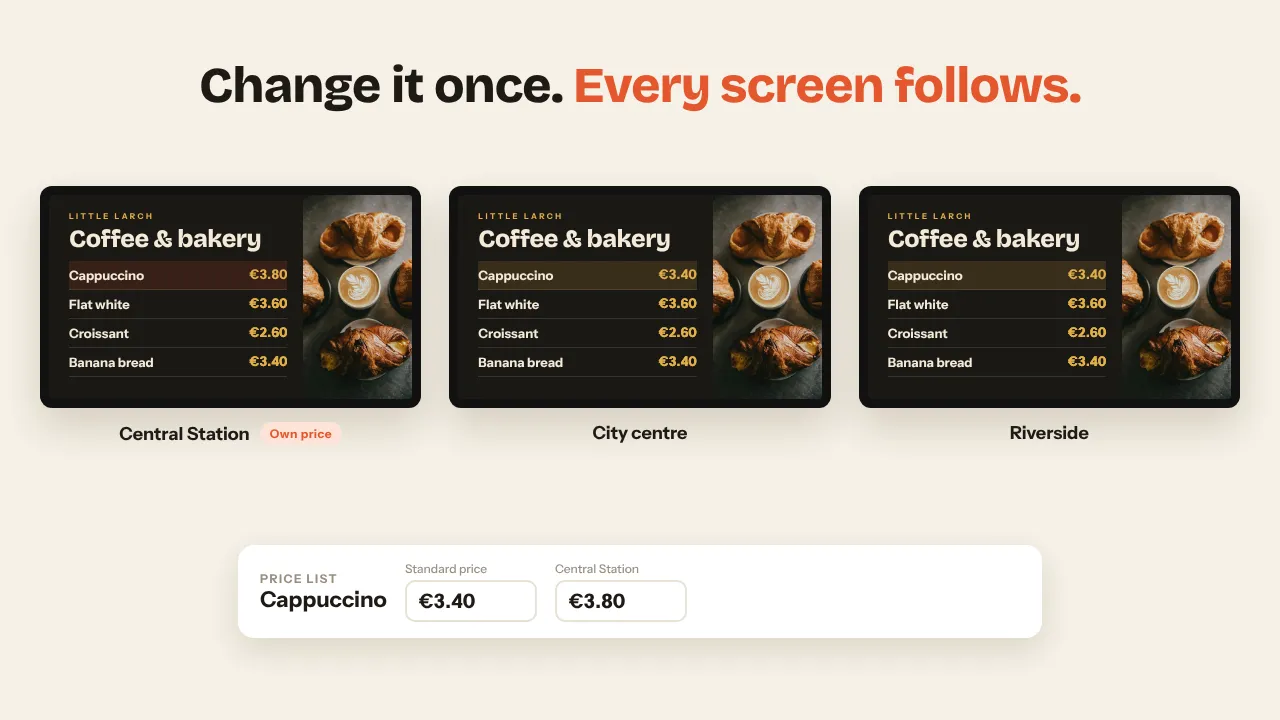
Marketing makes the menu board once. Every screen fills in the price of its own branch: more at the station, the deal price at the outlet, sold out where it ran out. A price increase goes through once, or waits for Monday 6:00 by itself.
Smart Prices is a Premium plugin, included in Pro and Business. Works on the TVs and players you already have.
Fifty branches should not mean fifty menu files
As soon as prices differ per branch, a menu board turns into a production job. A file per location, a new export for every price change, and somewhere a screen still shows last month's price. Smart Prices takes the price out of the design and keeps it in one list.
From one price list to every screen
One price list for every branch
Every product with a standard price. Only where a branch charges more or less do you type its own price; an empty field follows the standard. A product can be sold out at one branch only.
- Branches are the locations you already have under Team
- A screen without a location shows the standard price
- Import and export as a spreadsheet, a column per branch
The price goes into the design, not the file
In the Designer, choose Insert a price in any text block. The block gets a code such as {price:cappuccino} and keeps your font, size and colour. Photos, video and animation stay exactly the same everywhere.
- The editor shows the standard price
- Works in any layout, landscape or portrait
- Change the design once and every branch follows
Every screen fills in its own branch
Each screen knows its location and shows that branch's prices, or your sold-out text. Nobody renders, exports or uploads a version per branch, ever again.
- One playlist can run in every branch
- Prices are plain text, sharp on any screen
- A planned change switches every screen at its moment
Everything a price change needs, nothing it does not
Plan a price change
Set a new price for a date and time, for the standard price or one branch. At that moment every screen switches by itself, without anyone publishing anything.
Sold out, only where it is
Mark a product sold out at one branch and only its screens show your sold-out text instead of the price.
Excel in, Excel out
Export the whole list with a column per branch, change it in Excel and import it again, now or for a later moment. A dash returns a branch to the standard price.
From your till, ERP or automation
Your own system, Zapier, Make or n8n reads and updates the price list through the Data API, so the screen price is the till price. With effective_at the change waits for its moment.
Video behind the prices
The prices are text on top of the design. The video, photos and animation are the same in every branch; only the numbers differ.
Your currency, your format
21 currencies and the number format of your country, set once for the whole price list.
Made for chains with more than one price
Coffee and lunch chains
A higher price at the station or the airport than in the neighbourhood, with the same menu board and brand.
Bakery and sandwich chains
The same range on every screen each morning, and what ran out is sold out at that one branch.
Quick service and franchises
Head office makes the design and the campaign, every franchisee keeps their own prices.
Fuel stations with a shop
Coffee, sandwiches and deals on the screen at the till, at the price of that location.
Cinemas and leisure
Popcorn, drinks and combo deals above the counter, priced per venue.
Retail chains with regional prices
A deal price in the city that differs from the outlet, without making two campaigns.
Included in Pro and Business
Smart Prices is a Premium plugin. Branches are the locations of your account.
- 10 screens included, up to 100
- 3 locations
- Every Premium plugin, Smart Prices included
- Up to 3 users with roles
- 25 screens included, up to 100
- Unlimited locations
- Approval before publishing
- Up to 25 users, own branding
Prices excl. VAT, cancel monthly. Extra screens €2 a month each (€1.50 on Business). On Starter, Premium comes as an add-on. See all plans
Menu boards for chains, answered
Do I need a separate design for each branch?
No. You make one design in the Designer with a price code in a text block, such as {price:cappuccino}. Every screen fills in the price of its own branch. Change the design and every branch follows.
Can there be a video behind the prices?
Yes. The prices are text on top of the design, so the video, photos and layout are the same everywhere and only the numbers differ per screen.
How does a price increase reach every branch?
Change the standard price once, or plan it for a date and time. Every branch that follows the standard price switches at once; branches with their own price keep it. A whole price list can also come in through a CSV import or the API.
Can our till or ERP send the prices?
Yes. With a Data API key, your till, ERP, Zapier, Make or n8n sends products with their price per branch, now or for a later moment, and can mark products sold out per branch.
Which screens and players work?
Any TV or monitor with HDMI, with a Raspberry Pi, Amazon Signage Stick, Android box or Fire TV behind it, or the browser of a smart TV. Compatible screens you already have can often stay where they are.
Is there a free trial?
There is no trial period. You can start with a free account to look around, and book a short demo in which we show your own menu with the prices of two or three of your branches.
Also see: Smart Prices plugin · Digital menu boards · Data API · Teams and locations

See your own menu with your branch prices
Book a short demo and we put your menu with the prices of two or three of your branches side by side. Or create a free account and look around first.