AI Studio

Describe the screen. AI Studio designs it.

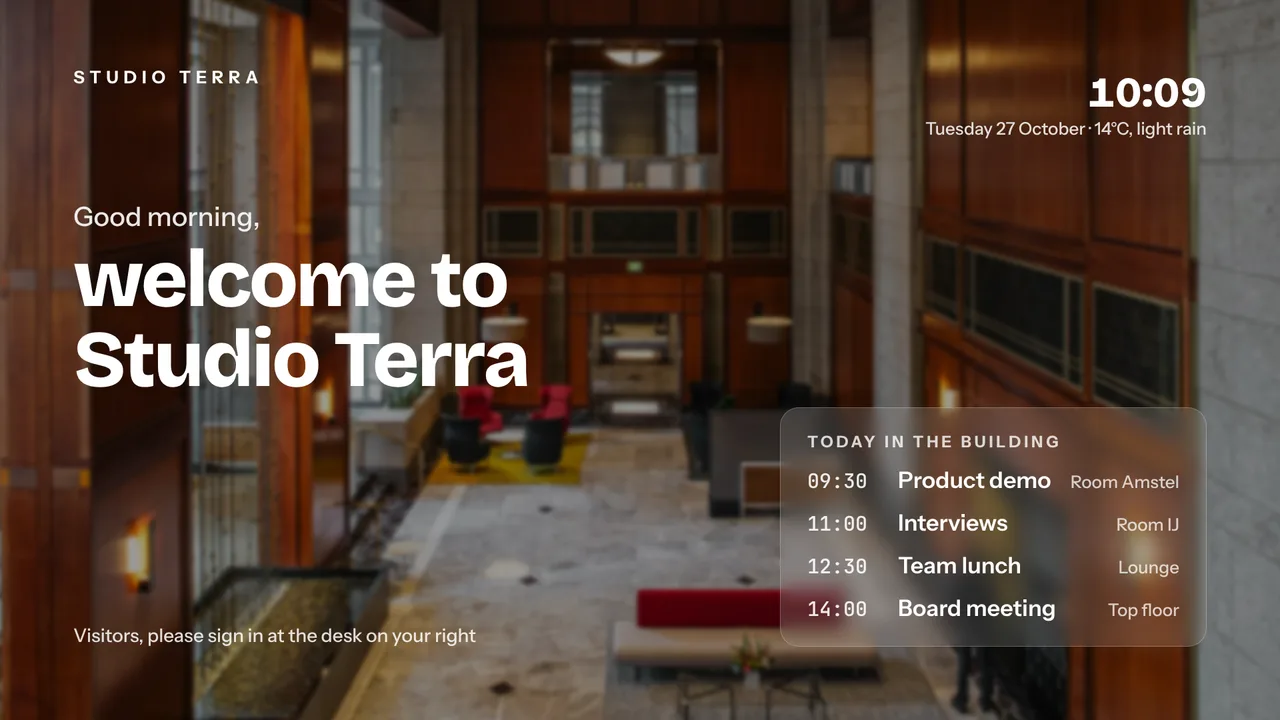
A welcome screen for the reception, a promo for the weekend, a safety notice for the workshop: describe it in a sentence, pick a style and AI Studio makes a complete, ready-to-use screen. Edit the result, then drop it in a playlist.

Free plan, no credit card required. Paid plans from €5/month. Plugin version v1.0.

AI Studio on a TV screen
On the screen

What the screen shows

A finished screen from a sentence

Headline, body, layout and imagery in one go, in the orientation of your screen.

Styles to choose from

Pick the mood: clean, bold, warm, corporate. The result follows.

Editable

Change the text, swap the image, adjust the colours before it goes live.

Straight into playlists

The screen is a slide like any other.

Setup

How it connects

01
Open AI Studio

Under Plugins, describe what you want on the TV.

02
Pick a style, generate

Choose the style and orientation. AI Studio drafts the screen.

03
Edit and push

Fine-tune the text and colours, then add the slide to a playlist.

Privacy

What reaches the screen

Your description is used to generate the screen and nothing else. Generated screens belong to your account.

Read only: TVpilot never changes anything in the source
Credentials sealed at rest, never shown again after saving
Revoke on the platform side at any time and the screen stops
Any TV

Show it on the TV you already own

TVpilot turns the hardware you have into a managed screen: an Amazon Signage Stick with the TVpilot app, a Raspberry Pi with one command, a Fire TV Stick or Android TV, or simply the browser of a smart TV. One player URL per screen, managed from the dashboard.

Amazon Signage StickRaspberry Pi signageFire TV Stick signageSmart TV, no hardware
Pricing

Free for your first screen

This plugin is included in every plan, the free one too. You pay for screens, not for integrations.

How many screens?

Free

Try TVpilot on one screen, for as long as you like.

Does not fit 3 screensOnly for 1 screen
Start free
Included1 screen
Extra screennot possible
Storage250 MB
  • All standard plugins
  • Scheduling: 1 calendar

Free, forever.No credit card. Try it on one TV.

Best fit for you

Starter

For a shop, practice or restaurant with a few screens.

3 screens€5per month
Choose Starter
Included3 screens
Extra screen€2 per month
Storage2 GB
  • Premium available as an add-on
  • Version history
  • Scheduling: 5 calendars

3 screens for €5.Each extra screen €2 per month.

Pro

For offices, schools and chains, with every Premium feature.

3 screens€29per month
Choose Pro
Included10 screens
Extra screen€2 per month
Storage10 GB
  • All Premium features
  • Up to 3 users, up to 3 locations
  • Version history

10 screens, all Premium.Review walls, triggers and the emergency alert included.

Business

For organizations with a team, approvals and many locations.

3 screens€99per month
Choose Business
Included25 screens
Extra screen€1.50 per month
Storage100 GB
  • All Premium features
  • Up to 25 users, unlimited locations
  • Approval before publishing
  • Own branding, priority support

Your whole team, safely.Roles for every colleague, and nothing goes live without approval.

What you keep

€17.08 per month

For 3 screens you pay €5 per month on Starter. At a typical per-screen price for the same features that is €22.08.

TVpilot Starter€5
Per screen elsewhere€22.08

Compared with typical per-screen prices for the same features: $8 standard, $12 with premium features, $15 with a team and approvals, per screen per month, billed yearly, converted at €0.92.

  • Extra screens from €1.50
  • Premium on Starter €9
  • Extra storage €10 per 25 GB
  • Cancel monthly
  • Prices excl. VAT

See every feature per plan

FAQ

Frequently asked questions

Is AI Studio included?

Yes, it is part of TVpilot. Generating screens uses AI, so a fair-use limit applies on the free plan.

Can I use my own logo and colours?

Yes. Set your branding once in Settings and AI Studio uses it.

Can I edit the result?

Yes. Text, image and colours are editable before the screen goes in a playlist.

Related articles
AI Digital Signage for Small Business: 7 Real Features
Create a Promotional Display With AI: 5 Prompt Recipes
How AI Is Actually Changing Digital Signage in 2026
Also see:Canva · Figma · Content bundle · Message bar · All design and content

Describe the screen. AI Studio designs it.

No design skills needed: describe what you want on the TV, pick a style, and AI Studio makes a ready-to-use screen for your playlists. Included with TVpilot.