WooCommerce dashboard

WooCommerce numbers
on the wall, not in a tab

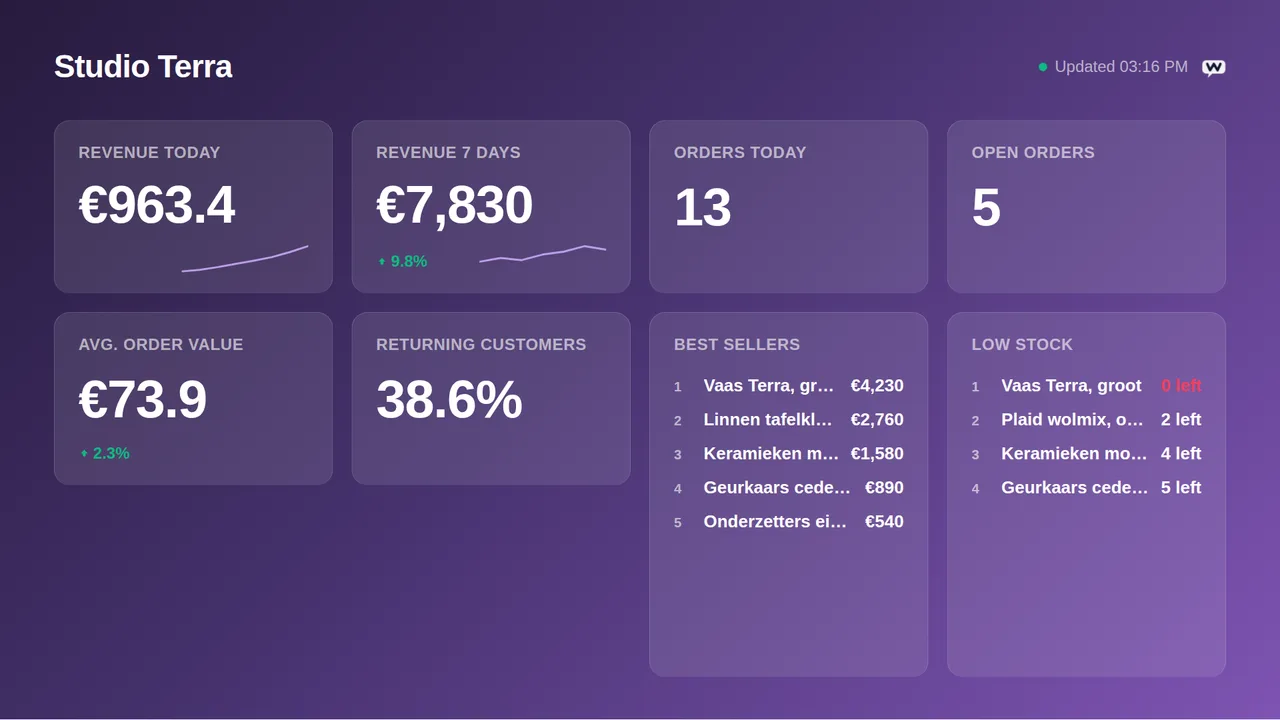
Your WooCommerce store on the office TV: revenue for today, this week and this month, orders and open orders, best sellers, average order value, returning customers and the products running low. One read-only REST API key from WordPress is all it takes.

Start free, 1 screen includedSee how it connects

Free plan, no credit card required. Paid plans from €5/month. Plugin version v1.1.
WooCommerce on a TV screen
On the screen

What the screen shows

Revenue today, this week, this month

From the WooCommerce analytics reports, with the delta against the period before.

Orders and open orders

Orders today and this week, and the ones still processing.

Best sellers

The products that sell most right now, ranked.

Average order value

How much a customer spends per order.

Returning customers

The share of orders from customers who bought before.

Low stock

Products under their stock threshold.

Setup

How it connects

01
Add a REST API key

In WordPress go to WooCommerce, Settings, Advanced, REST API, Add key.

02
Read permissions, admin user

Pick a user with administrator access (the analytics reports need it) and set Permissions to Read.

03
Paste key and secret

Copy the consumer key (ck_) and consumer secret (cs_), WooCommerce shows them once. Paste both in TVpilot, test, pick tiles, push to screen.

Privacy

What reaches the screen

The board shows totals, counts, product names and amounts, never a customer name or address. Keys are sealed on our servers, only ever used to read, and never shown again after you save them. Revoke them in the source at any time and the board stops.

Read only: TVpilot never changes anything in the source
Credentials sealed at rest, never shown again after saving
Revoke on the platform side at any time and the screen stops
Any TV

Show it on the TV you already own

TVpilot turns the hardware you have into a managed screen: a Raspberry Pi with one command, a Fire TV Stick or Android TV, or simply the browser of a smart TV. One player URL per screen, managed from the dashboard.

Raspberry Pi signageFire TV Stick signageSmart TV, no hardware
Pricing

Free for your first screen

Every plugin is included in every plan. You pay for screens, not for integrations.

Free
€0forever

Perfect for trying TVpilot with one screen.

Start free
Starter
€5/month

For small teams and single locations.

Start free
Pro
€19/month

For growing businesses with multiple locations.

Start free
Business
Customon request

Enterprise-grade signage at any scale.

Contact sales

Start on the free plan and stay there as long as you like. No credit card, no trial clock.

FAQ

Frequently asked questions

Why no visitor sessions?

WooCommerce has no visitor analytics of its own; sessions live in Google Analytics or a similar tool. The board shows orders, revenue, products and customers, which WooCommerce knows.

Does my store need WooCommerce Analytics?

The revenue tiles use the analytics reports that ship with WooCommerce. If your key cannot read them the board says so and shows the order-based tiles.

How often does it refresh?

Every 10 minutes, and the screen keeps the last numbers through a connection hiccup.

Can I hide amounts?

Yes. Switch amounts off or leave the revenue tiles out for a screen customers can see.

Does it work with a staging site?

Any reachable WooCommerce site with REST API access works, staging included.

Also see:Shopify · Magento · Mollie · Moneybird · All e-commerce dashboards · TV dashboards

WooCommerce numbers on the wall, not in a tab

Show live WooCommerce numbers on any TV: revenue today, this week and this month, orders, best sellers, average order value and low stock. Read-only REST API key, free plan available.

Start free with TVpilot

WooCommerce is a trademark of Automattic Inc. TVpilot is not affiliated with Automattic.